Posts

Showing posts with the label MXKEY

MXKEY v3.5 revision 1.2, Public-Release

Image
Partial fix: - NK   bugfixed, SL3 read PhoneIDs shows 'Operations not supported' ________________________________ v3.5 revision 1.2, Public-Release - MAIN   Added, Files synchronization feature    Allows to check and update important files with server without installing full setup.    Also usefull to minimize problems because of users patch.   Fixed, Access violation on XP for PC without HTI(WinUsb) installed   Check For updates and Signle module update removed(replaced with Synchronize Files) - NK(Nokia Service Tool)   Added, optional SX5 serial used for SL3 NCK calc (*)   Added, Latest flash update definition to setup   Added, Options to disable/enable RAPIDO new protocol for USB flashing   Added, Options to disable/enable embedded SBL for XGOLD flashing   Added, HTI SoftTMA Resistor selection (*)   Added, Local storage definition for DCC and RFBB data.   Added, DCC data verify after write ...

MXKEY MXBOX UPDATE v3.5 revision 1.0

Image
v3.5 revision 1.0, Public-Release What's new on MXKEY UPDATE MAIN - Update HTI button now always enabled. - Added local ping check for 'Server List' - Added taskbar progress support for Windows 7 (Nokia Service Tool) - Fully reworked flashing routines(workaround for HTI flashing bug) - HTIBOX connected as additional security service(if any) when using USB connection for standalone BB5 security fix operation - Fixed, Access violation on DCT4 Bus check when card connected HTI CCID reader - Fixed, Download in background task - BB5 Secure Storage and Certificate validation moved to Certificate manager page - BB5 Secure Storage, Certificate validation, Recover CERT, Load RFBB from server also supported with USB connection - Minor bug fixes

How To Update your MXBOX (HTI)

Image
Please read this update carefully step by step!  1. First step open mobileEx 3.5 then click update button

MXBOX v3.5 revision 0.0 New Update Realese

Image
MXBOX HTI (High Tech Interface) NOKIA FLASHER STANDALONE SX4AUTH, SD REPAIR, SIMLOCK REPAIR, NCK CALC, SL3 HASH CALC and SL3 NCK CALC MobileEx / MXBOX v3.5 revision 0.0 CHANGES: MAIN - Introduced HTI Firmware version 00.08 - HTI firmware update routine implemented. - Added, visual detail when MXKEY plugged to HTICCID. (Nokia Service Tool) - Added, STANDALONE security repair function for all hash for RAPUYAMA,RAPIDO,RAP3Gv4 phones. (required HTI with firmware 00.08 - please update your HTI BOX) * SX4AUTH (PA_SL/PA_SL2/PA_SL3/PA_SIMLOC30) * SL3 BF HASH CALC (PA_SL3/PA_SIMLOC30) * SD REPAIR (PA_SL/PA_SL2/PA_SL3/PA_SIMLOC30) * NCK CALC (PA_SL/PA_SL2) * SL3 NCK CALC (PA_SL3) HOW TO INSTALL MXBOX HTI: Unplug another box except mxbox Download mobileEx3.5patched_hti_rescue.rar Extract this downloaded file into your C:\mobileEx\3.5 directory, replace your current exe. Remove MXKEY smart card from HTI device, put it into your old card reader (MXKEY dongle). Repeat up...

MXBOX v3.4 revision 3.1 BB5 HASH patch update

Image
 What's New : Added FREE (NO CREDITS AND NO INTERNET) SD REPAIR for All RAPUYAMAbased phone for MXBOX/HTI. Added FREE (NO CREDITS AND NO INTERNET) SX4AUTH for All RAPUYAMA based phone for MXBOX/HTI. Added FREE (NO CREDITS AND NO INTERNET) FULL RPL BACKUP for All RAPUYAMA based phone for MXBOX/HTI. Added FREE (NO CREDITS AND NO INTERNET) SL3 BF HASH CALC for All RAPUYAMA based phone for MXBOX/HTI. - ALL HASHES Supported - Fixed, Manual erase address selection. - Minor bug fixes  

Free RPL With New MX KEY

Image
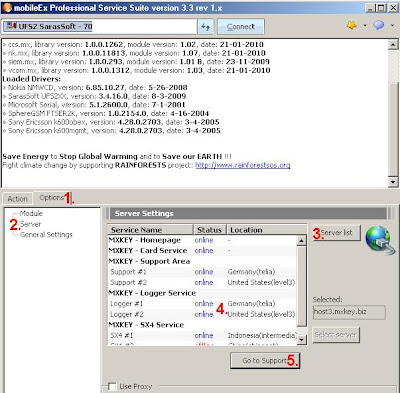
Free RPL MKEY v3.3 rev1.2 Anda harus punya koneksi ke Internet untuk melakukan ini Buka Mxkey v3.3 rev 1.2.. Jangan dulu melakukan koneksi MXKEY dengan box apa pun 1. Pilih tab option 2. Server 3. Klik Server list > 4 .Klik pada support, pilih #1 atau support #2 di support server area 5. Klik goto support akan langsung masuk ke web mxkey 6. Klik Reset Password 7. Password akan tampil diatas 8. Koneksikan MXKEY dengan Box favorite anda (UFSx).. 9. Pilih Nokia Service Tools 10.Klik Tab 'Service' 11. Klik Online Logger lalu Klik 'Imei & Security' 12. Masukan Password yang dari situs MXKEY 13. Login dan lihat hasilnya 14. Klik 'Do Selected Job' untuk mulai calculate RPL SELESAI. Semoga Beruntung You must have a connection to the Internet to do this Open MXKEY v3.3 rev 1.2 .. Do not connect to any interface 1. Select the option 2. Server 3. ">Click the Server list> 4. Click on support, select # 1 or # 2 in the support server support areas 5. Click g...

Mxkey update v3.3 revision 1.2, Public-Release

Image
v3.3 revision 1.2, Public-Release MAIN - Improved, interface communication routine (more stable) - Fixed, socket/internet communication bug for some pc(AMD bug) - Fixed, failed re-load module - Fixed, registration bug NOKIA - DCT4/DCT4+ RPL FREE to all MX-KEY users (support all ASICs) - Fixed, NFP extract - Fixed, WD2 flashing (UFS) - Minor bug fixes PS: credits will be used in future for other nice services from MX-KEY Team. Download from: MX-KEY - Official mirror http://rapidshare.com/users/P5JHS5 also available in support area and download page mobileEx_setup_v3.3_rev1.2_20100121_.exe 21.98 MB mobileEx_setup_v3.3_rev1.1_20100115_.exe 22.18 MB Buy only from MX-KEY authorized resellers: http://forum.gsmhosting.com/vbb/showthread.php?t=686432 MX-KEY v3.3 revision 1.2 public discussion thread: http://forum.gsmhosting.com/vbb/showthread.php?t=907249 MX-KEY official web sites: International - http://www.mx-key.com (in construction) Indonesia - http://id.mxkey.biz/ India - http://ww...

MX KEY v3.2 revision 5.6, Public-Release

Image
05/11/09 MX-KEY v3.2 revision 5.6, Public-Release #Minor update - MAIN Added, Application Signing system ~ This is new application security improvement ~ Application will check it signatures when needed, this will check unique card id, application version, and signature datetime validity ~ New created signature will be valid for next 6 month after signing ~ It means that after new update, you might need to 'Sign Application' if the current signature doesnt meet the requirement. ~ Before signing request, sw will set system datetime from ntp server if datetime is not correct. ~ Note: Make sure you have set you computer date,time. ~ The application signing system will not work on the computer with invalid date time ! Removed, Ping on server check Fixed, Windows Vista SP2 compability. - NK Added, BB5 RAPU USB Flashing(spesially for new Flash) Added, Dynamic Camera Configuration upload ~ This features located at 'Phone Test->Camera' Added, TIKU CDMA Product Data (PREPAID_...